
111 WG Game APK Download: New Version, Login & Play Guide
| Updated | Now |
| Size | 4.8 |
| Version | V4.2 |
| Requirements | Android 7.0 or higher |
| Downloads | 999+ |
| Get it on |  |
Description
111 WG Game is a name that users may encounter when searching for Android gaming platforms in Pakistan. In 2026, mobile gaming remains a popular way to explore digital entertainment, discover different game formats, and enjoy interactive experiences on smartphones. Before accessing a new platform, however, users should understand its purpose, requirements, available features, and safety considerations. best game on pakistan S1 Game
This guide explains the important things beginners should know about 111 WG Game, including its general overview, Android compatibility, download precautions, registration, login, troubleshooting, and frequently asked questions. It is written for informational purposes and aims to help readers evaluate the platform using clear, practical guidance.
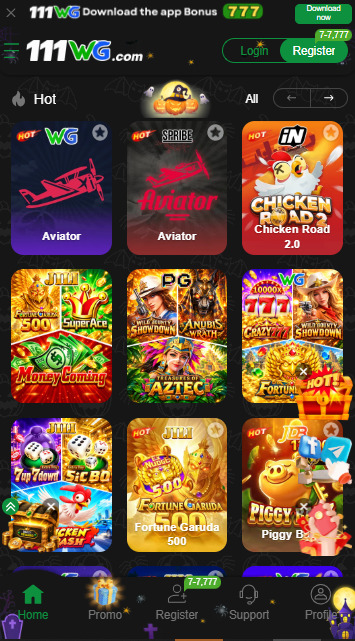
The exact launch date and official application details have not been independently confirmed. Different websites also display different version numbers and technical requirements for applications using this name. Therefore, users should verify the correct publisher and current application information before downloading anything.
What Is 111 WG Game?
111 WG Game is a name associated with websites promoting online gaming and mobile entertainment. Users searching for it may want to learn about its interface, explore the available activities, or understand how to access a version compatible with their Android devices.
However, the name alone does not establish whether a particular website or APK file is the official version. Several third-party pages may use similar names, descriptions, and branding. Checking the publisher’s identity is therefore an important first step.
Depending on the actual service, an online gaming platform may include game categories, account settings, help sections, and promotional information. These features should not be assumed to exist in 111 WG Game until they have been confirmed through reliable documentation.
Before proceeding, review the platform’s official information, terms of service, privacy policy, and supported devices. This will help you understand its requirements and decide whether it is suitable for your needs.
Key Features of 111 WG Game
The following sections explain features worth checking when evaluating 111 WG Game. They are general evaluation points, not a guarantee that every feature is available in the current version.
1. Mobile-Friendly Interface
A mobile-friendly interface helps users navigate an application comfortably on a smartphone. Clear menus, readable text, and organised sections can make the experience easier for beginners.
When exploring 111 WG Game, check whether the available interface works properly on your screen. Avoid pages with misleading buttons, repeated redirects, or confusing installation instructions.
2. Different Gaming Categories
Some online gaming platforms organise activities into different categories. This arrangement can help users identify the type of entertainment they prefer.
The specific categories available in 111 WG Game have not been independently verified. Check the current game catalogue before assuming that it includes particular card games, arcade activities, or other formats.
3. Account Management
Certain platforms offer account-based access with profile settings and login controls. If 111 WG Game requires an account, users should understand the registration requirements before sharing personal details.
Use a unique password and keep your verification codes private. Never provide confidential login information to someone claiming to represent the platform through an unofficial channel.
4. Application Updates
Application updates can address bugs, improve compatibility, and change the user interface. However, users should confirm that an update comes from a trustworthy publisher.
Check the release notes, version information, and compatibility requirements before replacing an existing installation. Do not assume that the newest file advertised by a third-party website is automatically authentic.
5. Help and Support
Support information can help users understand account requirements and resolve technical issues. Look for clearly presented contact information and explanations of how problems are handled.
If a website provides no meaningful support details or asks for unnecessary confidential information, investigate further before proceeding.
6. Privacy and Security Controls
Privacy is important when using any account-based service. Check whether the platform explains how it collects, processes, stores, and shares personal information.
A privacy policy is useful, but its presence alone does not establish that a service is trustworthy. Read the available information and avoid sharing details that are not necessary for the service.
111 WG Game Download for Android
People searching for 111 WG Game Download should first confirm whether an official Android application is available and identify its verified publisher.

The Google Play Store is generally a good starting point for finding Android applications. If a platform is not listed there and offers an APK file through a website, additional checks are necessary.
An APK is an Android application package. It is a standard installation format, but the file extension does not guarantee that the application is authentic or safe.
Before downloading, follow these precautions:
- Verify the website address and publisher information.
- Check whether the developer provides an official download page.
- Confirm the application’s version and Android requirements.
- Avoid modified APK files and unfamiliar file-sharing websites.
- Review requested permissions before installing.
- Keep Android and your device’s security protections updated.
- Do not disable security features just to install an unfamiliar file.
- Stop if the download page redirects you to an unrelated website.
If you cannot verify the file’s origin, avoid installing it. Protecting your device is more important than obtaining an application quickly.
How to Install 111 WG Game on Android
The exact installation procedure depends on whether the developer provides an official Android application. The following steps explain the general process.
Step 1: Find a Verified Source
Identify the official publisher and check whether the download page can be linked to that publisher. Do not rely exclusively on search rankings, promotional banners, or user comments.
Step 2: Check Device Compatibility
Review the stated Android version, storage requirements, and other technical specifications. The minimum requirements displayed on third-party pages may be inaccurate or outdated.
Step 3: Download the Application
If a trustworthy official file is available, follow the publisher’s instructions. Check the filename and source before opening it.
Step 4: Review the Security Warning
Android may display a warning when an application comes from outside the Google Play Store. Do not dismiss that warning automatically. Confirm the source and understand the potential risks first.
Step 5: Review App Permissions
Check whether the requested permissions are appropriate for the application’s stated purpose. Be cautious about unnecessary access to contacts, messages, accessibility controls, or other sensitive device functions.
Step 6: Open the Application
If installation completes successfully, review the welcome screen, privacy policy, and terms of service. If the application behaves unexpectedly or requests unrelated permissions, stop using it and investigate.
These are general Android instructions, not confirmation that a particular 111 WG Game APK is authentic.
111 WG Game Registration Guide
Registration requirements depend on the actual platform. Some services require an account, while others allow users to browse without registering.
If registration is available and necessary, follow these general steps:
- Open the verified official website or application.
- Locate the registration option.
- Read the terms of service and privacy policy.
- Provide only the information genuinely required.
- Complete the verification process described by the provider.
- Create a strong, unique password.
- Keep your account information private.
Do not use another person’s identity or provide unnecessary personal information. If the platform requests sensitive information without explaining why it is required, pause and investigate before continuing.
111 WG Game Login Guide
Returning users should access the service through a verified website or application. Enter your account details carefully and avoid login links sent by unknown people.
If you cannot log in, try the following checks:
- Confirm that the website address is correct.
- Check your internet connection.
- Verify that you entered the correct account details.
- Use the official password recovery process if available.
- Check for legitimate service notices or maintenance announcements.
- Contact verified support if the issue continues.
Never disclose your password or one-time verification code to another person. If a login page asks you to install an unrelated application or provide unnecessary permissions, stop and investigate.
Is 111 WG Game Safe?
The safety of 111 WG Game cannot be established from its name or logo alone. It depends on the specific application, its publisher, its security practices, and the way it handles user information.
Before accessing the platform, consider these factors:
Publisher transparency: Look for an identifiable developer or operator and check whether its details can be verified independently.
Website security: Check for HTTPS and a valid browser connection. HTTPS protects data in transit, but it does not prove that the website itself is legitimate.
Privacy policy: Understand what information the service collects and how it uses or shares that information.
Application permissions: Be cautious if the app requests access unrelated to its stated purpose.
Independent reviews: Look for credible reports from sources that are not controlled by the platform. Do not treat promotional testimonials as independent proof.

Support information: Check whether the provider explains how users can report issues or ask questions.
Local requirements: Confirm the laws and age restrictions that apply to the specific service and its activities in your location.
Until these points have been checked, avoid describing the platform as completely safe, officially approved, or independently verified.
Advantages and Limitations of 111 WG Game
A balanced review should explain both the possible advantages and the uncertainties that users need to consider.
Potential Advantages
- Mobile access may be convenient if the service supports Android devices.
- A clear interface can make navigation easier.
- Written instructions may help beginners understand the platform.
- Transparent privacy information can help users make informed decisions.
- Documented compatibility requirements can reduce installation problems.
- Organised menus may help users locate available sections.
These are general benefits to look for, not verified claims about every version of 111 WG Game.
Potential Limitations
- The official publisher may be difficult to identify.
- Third-party websites may show inconsistent version details.
- Unverified APK files can create security risks.
- Registration may require sharing personal information.
- Available features may vary between versions.
- Unclear terms can make it difficult to assess the platform’s reliability.
Users should consider these factors before deciding whether to access the service.
Tips for Beginners
If you are researching 111 WG Game for the first time, these practical tips can help you make a more informed decision.
- Verify the publisher before downloading an application.
- Read the official documentation and available terms.
- Check your device’s compatibility.
- Use a unique password if registration is required.
- Keep your operating system and security protections updated.
- Avoid unfamiliar download buttons and suspicious links.
- Review permissions before installation.
- Never trust claims that guarantee particular outcomes.
- Protect personal information and account credentials.
- Stop if the application behaves unexpectedly.
If the service includes betting-style activities, understand the associated financial risks and applicable legal requirements. Set firm personal limits and do not treat participation as a dependable source of income.
Common Problems and Their Solutions
The Application Does Not Install
Check your device’s available storage and compatibility. If the installation file is incomplete, delete it and seek a verified source rather than repeatedly attempting to install the same file.
The Application Does Not Open
Check your internet connection and device compatibility. Restart your phone and review any official service notices. Avoid downloading replacement files from unknown sources.
Login Does Not Work
Check your credentials and use the official recovery option if available. Do not share verification codes with anyone offering unofficial assistance.
The Application Runs Slowly
Close unnecessary background applications, check available storage, and use a stable connection. If the issue continues, consult verified support information.
An Unexpected Permission Appears
Pause before granting access. Consider whether the permission is necessary for the application’s purpose. If it appears unrelated, do not proceed until you understand why it is requested.
Frequently Asked Questions About 111 WG Game
1. What is 111 WG Game?
111 WG Game is a name associated with online gaming and mobile entertainment websites. Verify the exact publisher, current features, and official source before accessing a particular version.
2. Was 111 WG Game launched yesterday?
The claimed launch date has not been independently confirmed. Check a dated announcement from the verified developer before describing it as a newly launched platform.
3. Where can I download 111 WG Game?
First establish whether an official application is available. Use a source you can verify and check the publisher, file version, and device requirements before downloading.
4. Is 111 WG Game available for Android?
Android availability should be confirmed through current documentation from a reliable source. Do not assume that a third-party APK listing represents an official release.
5. Does 111 WG Game require registration?
That depends on the specific service. Review its current access instructions to determine whether an account is required and what information may be requested.
6. Can I use 111 WG Game on a computer?
Computer compatibility has not been independently confirmed. Check whether the provider supports desktop browsers or offers an official computer version.
7. How can I protect my account?
Use a unique password, keep verification codes private, avoid suspicious login links, and review the platform’s privacy information. Contact verified support if you notice unusual activity.
8. What should I do if the application stops working?
Check your connection, device compatibility, and any official service announcements. Avoid installing unknown replacement files or disabling security protections to solve the problem.
Final Thoughts on 111 WG Game
111 WG Game is a name that users may encounter while researching Android gaming platforms in Pakistan. Before accessing it, verify the publisher, current application details, available features, device requirements, and privacy policies.
Android users should pay particular attention to the source of any APK file. A download link, attractive logo, or promotional description does not prove that an application is authentic or secure.
The best approach is to rely on current, verifiable information rather than assumptions. Review the relevant documentation, understand the applicable rules, and protect your personal details when exploring unfamiliar services.
Looking for 111 WG Game download information? First confirm the official website and application details. Proceed only when the source and installation requirements are clear, and avoid unverified files.
This guide is intended for informational purposes. Confirm all platform-specific details before publishing them as established facts.
Download links
How to install 111 WG Game APK Download: New Version, Login & Play Guide APK?
1. Tap the downloaded 111 WG Game APK Download: New Version, Login & Play Guide APK file.
2. Touch install.
3. Follow the steps on the screen.
Related apps








Latest Apps
-
 555JC Game Download – Easy Guide for Android (2026)V1.2 555JC APK
-
 111 WG Game APK Download: New Version, Login & Play GuideV4.2
-
 JZ666 Game Apk (Safe Online PKR Money Earning App) 2026V1.2
-
 ZAV Game: Features, Rewards, JazzCash & Easypaisa GuideV1,0,1 ZAV Game
-
 kk5 win Game APK (Best Earning App) Download for AndroidV4.2 kk5 win Game APK
-