
EP555 Game Download 2026 – Complete Guide for Android
| Updated | today |
| Size | 4.8 |
| Version | V1.2 |
| Requirements | Android3+ |
| Downloads | 999+ |
| Get it on |  |
Description
EP555 Game is a name that users may come across when searching for new mobile gaming platforms in 2026. Many Android users in Pakistan enjoy exploring new gaming applications and learning about their features before installing them. However, finding reliable information about a newly introduced platform can sometimes be difficult. most play game on pakistan KushWin Game
If you are searching for EP555 Game, this guide will help you understand the important things to consider before accessing it. We will cover general platform information, Android compatibility, possible gaming features, installation instructions, registration, login, troubleshooting, and safety precautions.
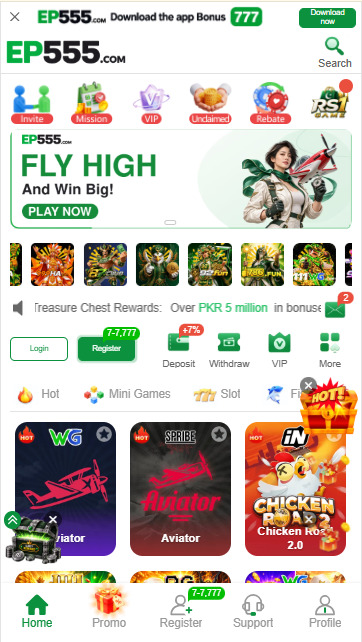
Our purpose is to provide clear and useful information for beginners. Since EP555 is a relatively unfamiliar name and its official technical details have not been independently confirmed, users should verify the latest information through a trustworthy source before downloading any application.
What Is EP555 Game?
EP555 Game is a gaming-related platform name that users may search for when looking for new mobile entertainment options.
People interested in new gaming applications usually want to know how a platform works, what type of interface it provides, whether it supports Android smartphones, and how they can access its available options.
Before using EP555 Game, it is important to identify the exact application or website associated with this name. Different websites sometimes publish similar names, and their descriptions may not always represent the same application.
Users should check the developer information, official website, application details, and privacy policy before making a decision.
A trustworthy gaming platform should provide understandable instructions, transparent policies, and appropriate information about its services.
EP555 Game Information at a Glance
Here is a basic overview of the information users should check.
| Information | Details |
|---|---|
| Game Name | EP555 Game |
| Category | Online Gaming |
| Target Audience | Pakistani Users |
| Main Platform | Mobile |
| Device Compatibility | Verify current requirements |
| Android APK | Check official availability |
| Registration | Verify platform requirements |
| Login | Check available account options |
| Language | Verify supported languages |
| Latest Version | Not independently confirmed |
| Developer | Not independently confirmed |
| File Size | Not independently confirmed |
Please do not rely on specifications copied from unrelated websites. Always check the exact application you intend to install.
Main Features to Explore in EP555 Game
When exploring a new gaming platform, users should understand its interface and available functions. The following sections explain important features to look for when reviewing EP555 Game.
1. User-Friendly Interface
A simple interface makes a gaming platform easier to understand. Beginners generally prefer clearly labelled buttons, organised menus, and readable instructions.
When opening EP555, check whether the home screen makes important sections easy to locate.
2. Mobile Compatibility
Mobile compatibility is important for users who prefer playing games on smartphones.
An application should display properly on different screen sizes and work with compatible Android versions. However, actual compatibility depends on the application’s technical requirements.
3. Gaming Categories
Gaming categories help users understand the types of entertainment available on a platform.
If EP555 provides multiple gaming sections, users should review their descriptions and instructions before selecting an option. The actual game selection should always be confirmed in the current version.
4. Account Management
Account management can help users control their profile information and security settings.
If EP555 supports user accounts, check whether it provides options for changing passwords, reviewing account details, and accessing support.
5. Easy Navigation
Navigation is another important part of the mobile experience.
A properly organised platform should make it easy to move between the home screen, available games, profile settings, and help sections.
6. Application Updates
Updates may improve compatibility, fix technical problems, and introduce interface changes.
Users should always check the version information before installing a new application. Avoid downloading modified files from unknown websites.
How to Download EP555 Game on Android
Many users search for EP555 Game APK Download because they prefer accessing mobile applications directly on their Android smartphones.

Before downloading, confirm that an authentic application is actually available. Do not assume that every website displaying an EP555 download button provides a verified installation file.
Follow these general steps:
- Find the verified official EP555 website, if available.
- Locate its Android download section.
- Check the application name and developer information.
- Review the available version and file size.
- Check the minimum Android requirements.
- Read the requested application permissions.
- Download the file only after verifying its source.
- Scan the downloaded file before installation.
If you cannot identify a trustworthy download source, avoid installing the APK until its authenticity is confirmed.
How to Install EP555 Game on Android
If an authentic Android APK becomes available, you can follow these general installation instructions.
Step 1: Download the APK
First, download the compatible installation file from a verified source.
Make sure the download finishes properly. An incomplete file may cause installation errors.
Step 2: Open Your Downloads Folder
Open the File Manager application on your smartphone and locate the downloaded APK.
Check the filename before opening it.
Step 3: Review Security Permissions
Android may display a warning when installing an application outside the Google Play Store.
Review the warning carefully. Only consider allowing installation when you trust the source and have checked the file.
Step 4: Complete the Installation
Follow the instructions displayed on your smartphone if you decide the application is safe to install.
Step 5: Open the Application
Once installation finishes, look for the application icon on your home screen.
Open it and check whether the interface works correctly.
Remember to disable the permission for installing unknown applications when you no longer need it.
How to Register on EP555 Game
Some online gaming platforms require users to create an account before accessing their services.
If EP555 provides a registration option, the general process may include the following steps:
- Visit the verified platform.
- Find the Register option.
- Read the account requirements.
- Enter the information requested by the platform.
- Create a strong password.
- Complete any required verification.
- Review the terms and conditions.
- Finish the registration process.
Never share your password or verification code with another person.
Also, avoid providing unnecessary personal information to unfamiliar websites.
EP555 Game Login Guide
Returning users may be able to access their accounts through a login option if the platform supports account registration.
A general login process involves:
- Open the verified EP555 website or application.
- Select the Login option.
- Enter your registered account details.
- Complete any requested verification.
- Continue if the information is correct.
If you experience login problems, check your internet connection and account details.
Use the official password recovery option if you forget your password. Never trust unknown people offering to recover your account through private messages.
Is EP555 Game Available for Android?
Android users often prefer mobile applications because they can access compatible services directly from their smartphones.
However, the Android availability of EP555 should be checked through an official source.
Before installing an application, consider these important factors:
- Your smartphone’s Android version.
- Available internal storage.
- Device memory and processing capability.
- Internet connection quality.
- Application compatibility.
- Required installation permissions.
An application may not work properly on older smartphones if its technical requirements are higher than the device specifications.
Therefore, check the latest compatibility information before installation.
EP555 Game User Interface and Navigation
The user interface can influence how easily beginners understand a gaming platform.
When exploring EP555, pay attention to the following sections if they are available.
Home Screen: The home screen generally introduces the main platform and provides access to different sections.
Game Section: This area may display available gaming options and their instructions.
Profile Section: If account features are supported, users may find their profile and account settings here.
Help Section: This section should provide guidance for common questions and technical problems.
Settings Section: Users may find application preferences and other configuration options here.
Take some time to understand each section instead of clicking unfamiliar buttons.
Important Safety Tips Before Using EP555 Game
Online security should always be a priority when exploring a new mobile gaming application.
Here are some practical precautions.
Verify the Official Website
Check the website address carefully before downloading an application or entering account information.
A professional-looking website does not automatically prove that a platform is genuine.
Review the Privacy Policy
The privacy policy should explain what information the platform collects and how it handles user data.
Read it before creating an account.
Check Application Permissions
Review every permission requested by the APK.
Be careful if an application requests access that does not appear necessary for its functions.
Avoid Modified APK Files
Modified installation files can contain unwanted software or create security problems.
Use verified sources instead of unknown download links.
Protect Your Account
Create a unique password and keep your verification information private.
Never share your login details with strangers.
Check Customer Support
Look for clear support information before using the platform.
A reliable service should explain how users can report problems and request assistance.
Common EP555 Game Problems and Solutions
Beginners may experience technical problems when accessing unfamiliar applications. Here are some general solutions.
1. EP555 APK Is Not Installing
Check whether the APK is complete and compatible with your Android version.
Also, make sure your smartphone has sufficient storage.
2. Application Is Not Opening
Restart your device and check whether an updated version is available from a verified source.
If the issue continues, review the application compatibility requirements.
3. Login Is Not Working
Check your username and password carefully.
Make sure your internet connection is stable. If necessary, use the official account recovery process.
4. Application Is Running Slowly
Close unnecessary background applications and free up some storage space.
Restarting your smartphone may also help resolve temporary performance problems.
5. Internet Connection Error
Check your Wi-Fi or mobile data connection.
If other applications are working normally, the issue may be related to the platform’s service.
6. Application Update Problems
Always check the official version information before updating.
Avoid installing multiple APK files from different websites because they may represent different applications.
Advantages and Limitations of EP555 Game
Before choosing any mobile gaming platform, users should consider both its potential advantages and possible limitations.
Possible Advantages to Explore
- Mobile-focused gaming access.
- Opportunity to explore available entertainment options.
- Convenient navigation if the interface is well organised.
- Account management options, if supported.
- Access through compatible Android devices.
- Potential application updates.
These are areas to evaluate rather than confirmed EP555 features.
Important Limitations
- Official technical information is currently limited.
- The developer identity needs verification.
- Android compatibility is not independently confirmed.
- The latest APK version is unknown.
- Available gaming categories need confirmation.
- Application security should be checked before installation.
Understanding these limitations helps users avoid incorrect expectations.
Tips for New EP555 Game Users
If you are interested in exploring EP555 Game, keep these suggestions in mind:
- Verify the correct application before downloading.
- Read the available instructions carefully.
- Check Android compatibility.
- Use a secure internet connection.
- Avoid unknown installation files.
- Review the privacy policy.
- Protect your account information.
- Never share verification codes.
- Check the latest application information.
- Contact official support if you experience problems.
These habits can help beginners make informed decisions.
Responsible Gaming and User Awareness
Gaming applications should be used responsibly and primarily for entertainment.
Users should maintain a healthy balance between gaming and everyday activities. Avoid spending excessive time on mobile applications, and take regular breaks.
Before using any platform, understand its rules, available features, and applicable restrictions.
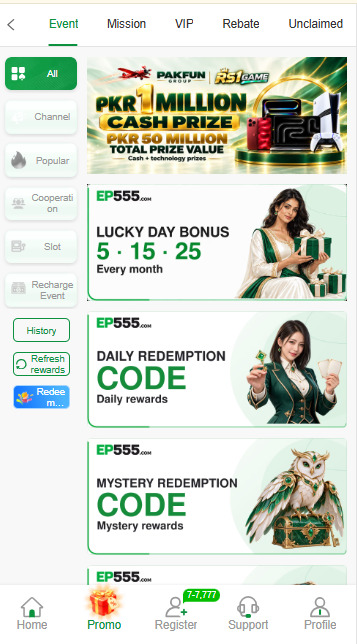
If an application contains promotional or account-related conditions, read them carefully. Do not trust advertisements that promise guaranteed results or unrealistic benefits.
Users in Pakistan should also consider applicable local laws and regulations before accessing online gaming services.
Frequently Asked Questions About EP555 Game
1. What Is EP555 Game?
EP555 Game is a gaming-related name that users may encounter when searching for new mobile gaming platforms. Its official features should be confirmed through a verified source.
2. Is EP555 Game Available for Android?
Android availability should be checked through the platform’s official information. Verify the APK source and device requirements before installation.
3. How Can I Download EP555 Game?
If an official Android version is available, visit its verified website and follow the download instructions. Avoid unknown APK sources.
4. How Do I Install EP555 Game?
Download a verified compatible APK, review its security information, and follow the normal Android installation instructions.
5. Does EP555 Game Require Registration?
Registration requirements depend on the platform. Check its current instructions to understand whether an account is necessary.
6. How Can I Log In to EP555 Game?
If account access is supported, open the verified application, select Login, and enter your registered details.
7. Is EP555 Game Safe to Use?
Its safety cannot be guaranteed without verifying the exact application and developer. Review the download source, privacy policy, permissions, and security information first.
8. Why Is EP555 Game Not Working?
Possible reasons include internet problems, device incompatibility, outdated application files, or temporary service issues.
9. Can I Use EP555 Game on an Old Android Phone?
Compatibility depends on the application’s minimum Android requirements. Check the current technical information before installation.
10. Where Can I Find EP555 Game Updates?
Check the verified official website or recognised application source for current update information.
Final Words
EP555 Game is a name that users may discover while searching for new mobile gaming options in 2026. Before accessing an unfamiliar platform, it is important to understand its application requirements, available features, account options, and security information.
This guide provides an introduction to EP555 Game and explains the important steps users should consider before downloading or installing an application.
Android users should always verify the APK source, review application permissions, and protect their personal information.
If you are interested in EP555 Game, first look for its verified official information and confirm that the application is compatible with your smartphone.
Download EP555 Game: Before downloading, check whether an authentic Android version is available through a verified source. Review the latest version, application requirements, and security details before proceeding. Your device safety should always come first.
Download links
How to install EP555 Game Download 2026 – Complete Guide for Android APK?
1. Tap the downloaded EP555 Game Download 2026 – Complete Guide for Android APK file.
2. Touch install.
3. Follow the steps on the screen.
Related apps







Latest Apps
-
 555JC Game Download – Easy Guide for Android (2026)V1.2 555JC APK
-
 111 WG Game APK Download: New Version, Login & Play GuideV4.2
-
 JZ666 Game Apk (Safe Online PKR Money Earning App) 2026V1.2
-
 ZAV Game: Features, Rewards, JazzCash & Easypaisa GuideV1,0,1 ZAV Game
-
 kk5 win Game APK (Best Earning App) Download for AndroidV4.2 kk5 win Game APK
-