
K1 Game Download (Official Earning App) Pakistan 2026
| Developer | k1 game |
| Updated | now |
| Size | 2026 |
| Version | V4.2 |
| Requirements | Android3+ |
| Downloads | 999999+ |
| Get it on |  |
Description
K1 Game is a gaming application that has recently gained attention among users searching for new mobile gaming platforms. If you have come across the K1 Game name and want to understand what it offers, this guide provides a clear and informational overview of the platform, its features, Android compatibility, installation process, registration, gameplay, updates, and safety considerations. top 1 game XF777 Game and aj03 game
There is an important point about the launch date. Although K1 Game is being discussed as a new or recently launched platform, current publicly available information shows a K1 Game listing on Google Play that was updated on July 8, 2026, with the developer listed as TECHNOSPIRE GLOBAL. The listing also identifies the app under the Casino category and labels its content as simulated gambling. (Google Play) Therefore, the exact claim that K1 Game officially launched yesterday should be treated as unverified unless a separate official announcement confirms it.

This article focuses on useful information for people researching K1 Game, rather than making promotional claims. Because newly discussed gaming apps can change their features, versions, and availability, users should always check the latest information before installing or using the application.
What Is K1 Game?
K1 Game is a mobile gaming application designed around a casino-style gaming environment. The current Google Play listing describes the application as offering different gaming experiences and identifies it under the Casino category. It also lists simulated gambling in its content information.
The publicly available listing provides some useful information about the application and its developer. According to Google Play, the developer is TECHNOSPIRE GLOBAL, and the listing provides an email address and a Pakistan-based developer address.
At the same time, several third-party websites use the K1 Game name for APK-related content and provide their own descriptions of the platform. These descriptions are not necessarily identical, so users should distinguish between information provided by an application listing and claims published by independent websites.
For anyone researching K1 Game, checking the actual application listing, developer information, version details, and permissions is more useful than relying on a single promotional description.
Why Is K1 Game Getting Attention?
New mobile gaming applications often attract attention when users search for different gaming experiences, fresh interfaces, or recently updated apps.
K1 Game is currently visible through Google Play and several third-party gaming and APK websites. The Google Play listing shows that the application has received an update and is available under the Casino category.
Third-party websites also publish guides about K1 Game, including information about Android installation, account access, and available gaming categories. However, these sites can contain information that differs from the official application listing, so users should compare details before making decisions.
This is particularly important when researching a newly promoted application because screenshots, version numbers, download instructions, and feature descriptions can become outdated quickly.
Main Features of K1 Game
The exact features can vary according to the application version and region. However, the current public listing gives users several indications about the type of experience K1 Game provides.
1. Mobile Gaming Experience
K1 Game is designed for mobile users, making the application suitable for people who prefer playing games through a smartphone.
A mobile-focused interface can make it easier to move between different sections, open games, review account settings, and manage application preferences.
2. Multiple Game Categories
The Google Play description refers to different types of gaming experiences, including Minesweeper-style gameplay, building-related games, and slot-style games.
The exact game selection may change with future updates. Therefore, users should check the current version of the application instead of depending on older screenshots or third-party lists.
3. Simple Navigation
Gaming applications benefit from straightforward navigation because users generally want to reach their preferred game without going through complicated menus.
K1 Game presents itself as a gaming-focused application, with its description centered on accessing different types of games from one platform.
4. Android Compatibility
K1 Game is available through Google Play, which provides a standard Android installation route. The current listing also identifies the application as a mobile game. Compatibility can still vary depending on the Android version, smartphone hardware, available storage, and regional availability.
5. Application Updates
The Google Play listing shows an update dated July 8, 2026 and describes the current release as a first release in its update information.
Updates can introduce interface changes, bug fixes, compatibility improvements, or additional content. Users should therefore check the latest version before following older installation guides.
K1 Game Download Guide
For Android users, the safest approach is to identify the application through a trusted source before downloading it.
The current Google Play listing provides an official app-distribution route and identifies the developer as TECHNOSPIRE GLOBAL.
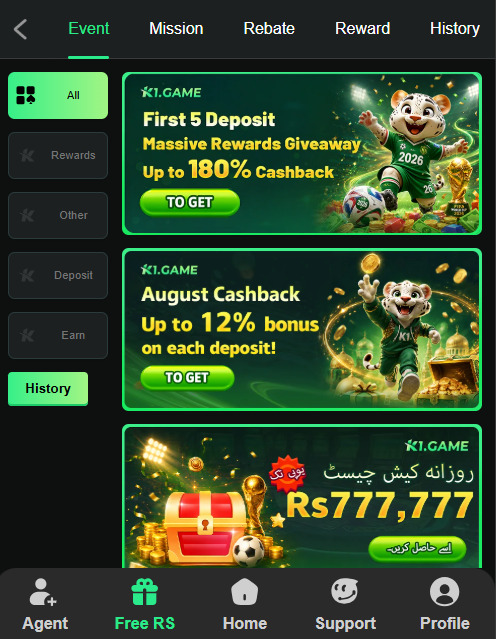
If you find an APK on another website, do not assume that it is identical to the application available through Google Play. Compare details such as:
- Application name
- Developer name
- Version number
- File size
- Package information
- Requested permissions
- Update date
- Source of the APK
Avoid downloading files from pages that provide unclear developer information or require unnecessary permissions.
How to Install K1 Game on Android
If you install K1 Game through Google Play, the process follows the normal Android application installation method.
Step 1: Open Google Play
Search for K1 Game and check the developer information before installing.
The current listing identifies TECHNOSPIRE GLOBAL as the developer.
Step 2: Check the Application Details
Review the application name, category, content information, and developer details.
This helps reduce the possibility of selecting an unrelated application with a similar name.
Step 3: Install the Application
Select the installation option and wait for Android to complete the process.
Step 4: Open K1 Game
Once installation finishes, open the application from your phone’s app menu.
If the application does not work correctly, check whether your device meets the required Android version and has enough free storage.
K1 Game Registration and Login
The exact registration process can depend on the current version of K1 Game.
If an account system is available, users may be asked to provide basic information before accessing certain sections.
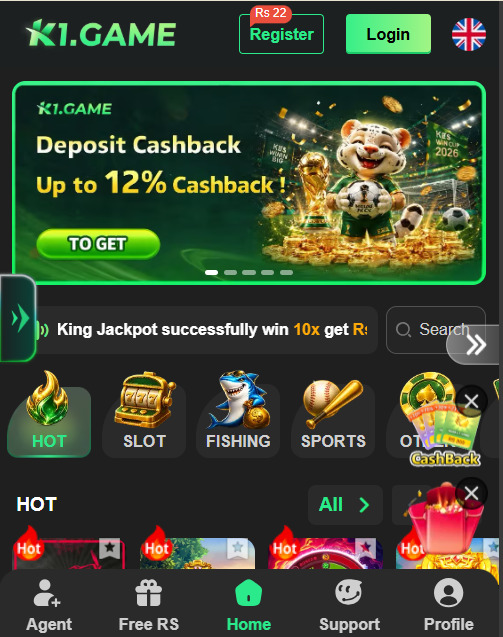
A typical account process may involve:
- Open K1 Game.
- Select the registration option if required.
- Enter the requested information.
- Create your login credentials.
- Complete any verification step shown by the application.
- Log in using the registered details.
Always use accurate information where required and protect your login credentials.
Do not share passwords, verification codes, or account details with people claiming to provide technical support through unofficial channels.
How to Play K1 Game
After opening K1 Game, start by exploring the main interface.
Look for the available game categories and read the instructions for each game before starting. Different games can have different controls, rules, and objectives.
For example, the Google Play description currently mentions Minesweeper-style gameplay, building-related games, and slot-style experiences.
If you are unfamiliar with a particular game, read its instructions first. Understanding the rules can make the experience easier and reduce accidental selections.
K1 Game User Interface
The user interface is an important part of any mobile gaming application.
A useful interface should make common functions easy to locate. These can include:
- Home screen
- Game categories
- Account section
- Settings
- Help or support
- Game instructions
- Update information
The interface can change after an application update, so screenshots published on older websites may not exactly match the current version.
K1 Game on Android Phones
Android users have several ways to encounter K1 Game online, including Google Play and third-party APK websites.
The Google Play listing is particularly useful for checking developer information and application details because the listing identifies the developer and provides the application’s data-safety information.
Before installation, make sure your phone has:
- Enough free storage
- A supported Android version
- A stable internet connection when required
- Updated Android security
- A working Google Play account if installing through Google Play
Older smartphones may experience slower performance when running newer applications.
K1 Game Data Safety Information
Data safety is an important part of researching any mobile application.
According to the current Google Play listing, the developer states that no data is shared with third parties and no data is collected. The listing also states that the application’s data is not encrypted and that data cannot be deleted. These are developer-provided disclosures on Google Play, so users should review the current listing themselves because such information can change.
This information is worth checking before installation because privacy practices can differ between application versions and distribution sources.
Users should also avoid giving an application unnecessary access to personal information.
Common K1 Game Problems
Like other mobile applications, K1 Game may encounter technical issues depending on the device and version.
Installation Problems
If the application does not install, check available storage, Android compatibility, and the source of the installation file.
When using an APK, an incomplete or damaged download can also prevent installation.
Application Crashes
If K1 Game closes unexpectedly, restart your smartphone and check whether an updated version is available.
Clearing temporary application data may also resolve certain problems.
Login Issues
If login does not work, carefully check the information entered.
Use the application’s official account-recovery option if one is available. Avoid third-party services asking for your password.
Slow Performance
Slow performance can result from limited storage, older hardware, background applications, or network problems.
Closing unnecessary applications and freeing storage can sometimes improve performance.
K1 Game Updates
Keeping track of updates is important when researching a newer gaming application.
The current Google Play information shows an update dated July 8, 2026.
Future updates may change:
- Game selection
- User interface
- Performance
- Compatibility
- Account features
- Security information
- Application permissions
For this reason, always check the current application version instead of relying entirely on an older K1 Game guide.
Is K1 Game a New Application?
K1 Game can currently be described as a recently discussed gaming application, but the exact claim that it launched yesterday, September 23, 2026, is not independently confirmed by the sources I found.
The current Google Play listing shows an update date of July 8, 2026, meaning the application existed on the platform before September 23.
Therefore, if a website has described September 23 as a “new launch,” that could refer to a new version, new promotion, new website listing, or renewed availability rather than the application’s first-ever release.
This distinction is useful for readers because it prevents an article from presenting an unverified launch date as an established fact.
K1 Game Developer Information
The Google Play listing currently identifies TECHNOSPIRE GLOBAL as the developer. It provides a support email and a Pakistan-based address in the developer information section.
However, users should understand that developer information can change over time. When downloading an application, compare the developer details shown on the current store listing with information published elsewhere.
This is especially important when multiple websites use the same application name.
Advantages of Researching K1 Game
From an informational perspective, K1 Game has several points that users may want to examine:
- It has a Google Play listing.
- Developer information is displayed on the listing.
- The application provides several types of gaming experiences.
- Android users can access the application through a standard app-distribution platform.
- The application has received an update.
- Its data-safety information is publicly displayed on Google Play.
These points describe the publicly available information rather than guarantee a particular user experience.
Things to Check Before Using K1 Game
Before installing or using any gaming application, users should check several basic details.
Verify the Developer
Make sure the developer name matches the expected application.
Check the Version
Older APK files may not match the latest version available through an official distribution channel.
Review Permissions
Only grant permissions that are necessary for the application to function.
Read Privacy Information
Check how the application describes data collection, sharing, encryption, and deletion.
Avoid Modified APKs
Modified application files can behave differently from the original version and may introduce additional security concerns.
Final Thoughts
K1 Game is a mobile gaming application that has attracted recent online attention. Current Google Play information identifies it as a Casino-category application developed by TECHNOSPIRE GLOBAL, with an update dated July 8, 2026. The listing describes several gaming experiences and marks the content as simulated gambling.
For users researching the platform, the most useful approach is to focus on verifiable information: the developer, application version, distribution source, available features, compatibility, privacy information, and installation method.
Although K1 Game may be described online as a newly launched platform, the exact claim of a September 23, 2026 first launch is not supported by the current Google Play information. Readers should therefore distinguish between a new listing, update, promotion, or version release and an application’s original launch.
As the application continues to receive updates, its features and interface may change. Checking the latest official listing before installation is the best way to avoid outdated information.
FAQs About K1 Game
What is K1 Game?
K1 Game is a mobile gaming application available through Google Play. The current listing places it in the Casino category and describes several gaming experiences.
Is K1 Game available on Android?
Yes. A K1 Game listing is currently available through Google Play for Android users.
Who is the developer of K1 Game?
The current Google Play listing identifies TECHNOSPIRE GLOBAL as the developer.
When was K1 Game updated?
The current Google Play listing shows an update date of July 8, 2026.
Does K1 Game have different types of games?
Yes. Its current Google Play description refers to Minesweeper-style gameplay, building-related games, and slot-style games.
Is K1 Game a new launch?
K1 Game is being discussed as a recent platform, but the claim that its first official launch occurred on September 23, 2026, could not be independently verified. The current Google Play listing shows activity before that date.
What should I check before installing K1 Game?
Check the developer, application version, distribution source, permissions, privacy information, and Android compatibility before installing the application.
Download links
How to install K1 Game Download (Official Earning App) Pakistan 2026 APK?
1. Tap the downloaded K1 Game Download (Official Earning App) Pakistan 2026 APK file.
2. Touch install.
3. Follow the steps on the screen.
Related apps






Latest Apps
-
 555JC Game Download – Easy Guide for Android (2026)V1.2 555JC APK
-
 111 WG Game APK Download: New Version, Login & Play GuideV4.2
-
 JZ666 Game Apk (Safe Online PKR Money Earning App) 2026V1.2
-
 ZAV Game: Features, Rewards, JazzCash & Easypaisa GuideV1,0,1 ZAV Game
-
 kk5 win Game APK (Best Earning App) Download for AndroidV4.2 kk5 win Game APK
-